Understanding the Landscape: Key Terms and Concepts
---------------------------------------------------
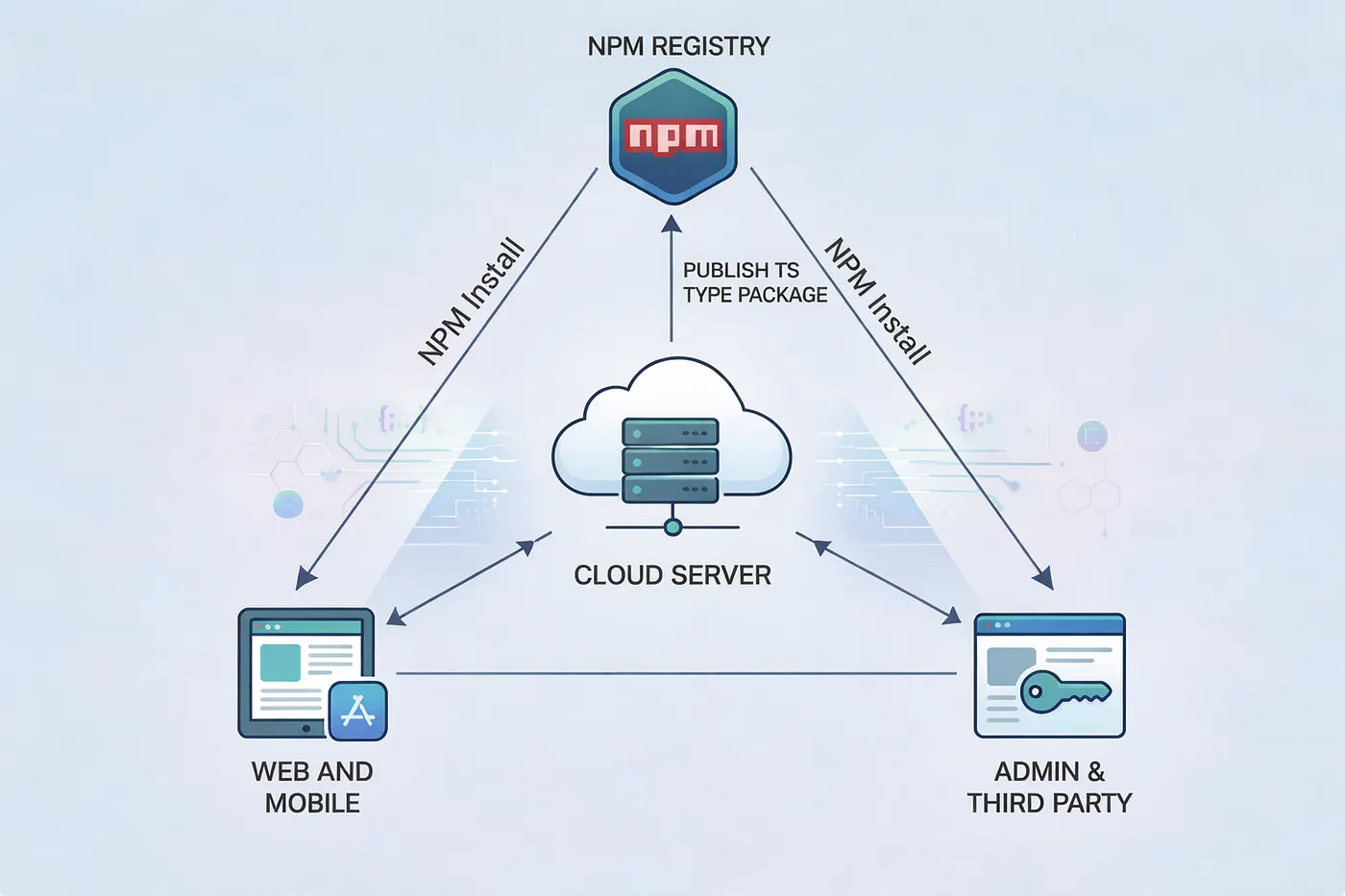
A types package* is a standalone npm package containing TypeScript type definitions without runtime code. Multiple applications can reference it to understand the shape and structure of your data. **Prisma**, an open-source ORM (Object-Relational Mapping) tool, sits between your application code and your database. It automatically generates TypeScript types from your database schema, representing your tables, relationships, and queries with complete *type safety (the compiler’s ability to verify that your code correctly uses data structures).
When you extract these Prisma-generated types into a dedicated package, you create a single source of truth. Your frontend applications, mobile apps, internal tools, third-party integrations, and any other service that interacts with your APIs can all consume it. This establishes an API contract: an explicit agreement about request and response structures. When your frontend requests data from your backend, both sides agree on exactly what shape that data takes. The automatic generation keeps your types in sync with your actual database structure. When shared across codebases, mismatches get caught at compile time (before your code runs) rather than relying on documentation, manual type definitions, or runtime validation.
Modern applications rarely exist in isolation. A typical architecture might include a backend API service (Node.js/Express, built with Prisma), web frontend (React, Next.js, or Vue), mobile applications (React Native or native apps with TypeScript), admin dashboards, third-party integrations, and microservices. Each needs to understand your data structures. Without a shared types package, teams resort to problematic approaches: copy-pasting types between repositories (falls out of sync immediately), manually recreating types in each codebase (error-prone and time-consuming), using `any` types (abandons type safety), or relying solely on API documentation (only catches errors at runtime).
The Technical Solution: Extracting Prisma Types Without the Dependency Baggage
------------------------------------------------------------------------------
The problem when sharing Prisma types is straightforward: you don’t want consuming applications to install Prisma itself. Prisma is a heavy dependency with database drivers, migration tools, and runtime logic that your frontend doesn’t need. What you want is a lightweight package containing only the type definitions. The solution is a build script that extracts type information from your Prisma schema and regenerates it as pure TypeScript interfaces and enums, decoupled from the Prisma client.
The Main Orchestration Function
-------------------------------
The extraction process operates in four distinct phases, coordinated by the main function:
async function generateBundledTypes() {
  try {
    console.log('📦 Generating Prisma Client...');
    const schemaPath = path.resolve(__dirname, '../../prisma/schema.prisma');
    // Phase 1: Trigger Prisma's own generation for validation
    await execPromise(`npx prisma generate --schema=${schemaPath}`);
    // Phase 2: Read and parse the schema
    const schema = fs.readFileSync(schemaPath, 'utf-8');
    const enums = parseEnumsFromSchema(schema);
    const types = parseTypesFromSchema(schema);
    const models = parseModelsFromSchema(schema);
    // Phase 3 & 4: Bundle and write output
    const bundledTypes = `/**
 * Auto-generated Prisma types
 * Generated from: ../prisma/schema.prisma
 * Do not edit this file manually
 */
${enums}
${types}
${models}
`;
    const outputPath = path.join(__dirname, '../src/prisma.ts');
    fs.writeFileSync(outputPath, bundledTypes);
    console.log('✅ Prisma types bundled successfully');
  } catch (error) {
    console.error('❌ Error:', error);
    process.exit(1);
  }
}
First, the script triggers Prisma’s own type generation using `npx prisma generate`, which ensures the Prisma client is up-to-date and validates that your schema is syntactically correct. This step serves as a validation gate before attempting to parse anything. Second, it reads your `schema.prisma` file as raw text and uses regex-based parsing to extract three categories of definitions. Finally, it bundles everything into a single TypeScript file with proper exports, complete with a header comment warning developers not to manually edit it since it's auto-generated.
Parsing Enums: String Literal Preservation
------------------------------------------
The enum parser extracts Prisma enums and converts them to TypeScript enums with string literal values, ensuring the enum values are preserved at runtime:
function parseEnumsFromSchema(schema) {
  const enumRegex = /enum\s+(\w+)\s*{([^}]*)}/g;
  const enums = [];
  let match;
  while ((match = enumRegex.exec(schema)) !== null) {
    const enumName = match[1];
    const enumValues = match[2]
      .split('\n')
      .map(line => line.trim())
      .filter(line => line && !line.startsWith('//') && !line.startsWith('@@'))
      .map(line => line.replace(/\s*\/\/.*$/, '').trim())
      .filter(Boolean);
    const enumDef = `export enum ${enumName} {
${enumValues.map(v => `  ${v} = "${v}",`).join('\n')}
}`;
    enums.push(enumDef);
  }
  return enums.join('\n\n');
}
The regex `/enum\s+(\w+)\s{([^}])}/g` looks for `enum EnumName { ... }` blocks throughout the schema. For each match, it extracts the enum name and the content between braces, then splits on newlines to get individual values. The filter chain removes empty lines, comments (starting with `//`), and Prisma attributes (starting with `@@`). Finally, it generates TypeScript enum syntax with string literal assignments:
// Input Prisma schema:
enum UserRole {
  ADMIN
  USER
  MODERATOR
}
// Output TypeScript:
export enum UserRole {
  ADMIN = "ADMIN",
  USER = "USER",
  MODERATOR = "MODERATOR",
}
This approach preserves the enum values at runtime, unlike TypeScript’s numeric enums, making them useful for API payloads and database queries.
Parsing Models and Types: Identical Structure, Different Semantics
------------------------------------------------------------------
The model and type parsers follow nearly identical patterns since Prisma’s syntax for both is similar:
function parseModelsFromSchema(schema) {
  const modelRegex = /model\s+(\w+)\s*{([^}]*)}/g;
  const models = [];
  let match;
while ((match = modelRegex.exec(schema)) !== null) {
    const modelName = match[1];
    const fields = parseFields(match[2]);
    const modelDef = `export interface ${modelName} {
${fields.join('\n')}
}`;
    models.push(modelDef);
  }
  return models.join('\n\n');
}
function parseTypesFromSchema(schema) {
  const typeRegex = /type\s+(\w+)\s*{([^}]*)}/g;
  const types = [];
  let match;
  while ((match = typeRegex.exec(schema)) !== null) {
    const typeName = match[1];
    const fields = parseFields(match[2]);
    const typeDef = `export interface ${typeName} {
${fields.join('\n')}
}`;
    types.push(typeDef);
  }
  return types.join('\n\n');
}
Both use regex to match `model ModelName { ... }` or `type TypeName { ... }` blocks, extract the name and field content, then delegate to `parseFields()` for the heavy lifting. The output for both is a TypeScript interface, since at the type level, Prisma models and composite types are structurally identical—they're both object shapes with named, typed properties.
Field Parsing and Type Mapping: The Core Translation Logic
----------------------------------------------------------
The field parser is where the real work happens — translating Prisma’s field syntax into TypeScript property syntax:
function parseFields(fieldsContent) {
  const typeMap = {
    'String': 'string',
    'Int': 'number',
    'BigInt': 'bigint',
    'Float': 'number',
    'Decimal': 'number',
    'Boolean': 'boolean',
    'DateTime': 'Date',
    'Json': 'any',
    'Bytes': 'Buffer',
  };
  return fieldsContent
    .split('\n')
    .map(line => line.trim())
    .filter(line => {
      // Filter out comments, attributes, and empty lines
      return line &&
             !line.startsWith('//') &&
             !line.startsWith('@@') &&
             !line.startsWith('@') &&
             line.length > 0;
    })
    .map(line => {
      // Match field patterns: fieldName Type[] ? @attributes
      const fieldMatch = line.match(/^(\w+)\s+(\w+)(\[\])?([\?\!])?/);
      if (!fieldMatch) return null;
      const [, fieldName, fieldType, isArray, modifier] = fieldMatch;
      // Check if it's a relation field (indicated by @relation)
      const isRelation = line.includes('@relation');
      // Map Prisma types to TypeScript types
      let tsType = typeMap[fieldType] || fieldType;
      // Handle arrays
      if (isArray === '[]') {
        tsType = `${tsType}[]`;
      }
      // Handle optional fields
      const isOptional = modifier === '?';
      // For relation fields without explicit optionality, make them nullable
      if (isRelation && !isOptional) {
        return `  ${fieldName}: ${tsType} | null;`;
      }
      return `  ${fieldName}${isOptional ? '?' : ''}: ${tsType}${isOptional ? ' | null' : ''};`;
    })
    .filter(Boolean);
}
Let’s break down how this transforms a Prisma model into TypeScript:
model User {
  id          String   @id @default(cuid())
  email       String   @unique
  name        String?
  role        UserRole @default(USER)
  posts       Post[]
  profile     Profile? @relation(fields: [profileId], references: [id])
  profileId   String?
  createdAt   DateTime @default(now())
}
The field parser processes each line:
1. Filters: Removes `@id`, `@default`, `@unique` lines since these are Prisma directives, not field definitions
2. Regex match: Extracts `fieldName`, `fieldType`, array notation `[]`, and optional modifier `?`
3. Type mapping: Converts `String` → `string`, `DateTime` → `Date`, leaves `UserRole` and `Post` as-is
4. Array handling: `Post[]` becomes `Post[]` in TypeScript
5. Optional handling: `name String?` becomes `name?: string | null`
6. Relation handling: `profile Profile?` gets special treatment as a nullable relation
The output becomes:
export interface User {
  id: string;
  email: string;
  name?: string | null;
  role: UserRole;
  posts: Post[];
  profile: Profile | null;
  profileId?: string | null;
  createdAt: Date;
}
Handling Optional vs. Nullable: The Dual Representation
-------------------------------------------------------
Notice the distinction between `name?: string | null` and `profile: Profile | null`. The script handles this by checking for the `?` modifier and the `@relation` attribute:
// Handle optional fields
const isOptional = modifier === '?';
// For relation fields without explicit optionality, make them nullable
if (isRelation && !isOptional) {
  return `  ${fieldName}: ${tsType} | null;`;
}
return `  ${fieldName}${isOptional ? '?' : ''}: ${tsType}${isOptional ? ' | null' : ''};`;
This dual representation (`fieldName?: string | null`) might seem redundant, but it accurately reflects Prisma's behavior. Optional fields can be missing from objects (`undefined`) or explicitly set to `null`, and consuming code needs to handle both cases. Relation fields are always nullable (can be `null` when not included) but not necessarily optional (might always be present in the object, just potentially `null`).
Why This Approach Eliminates the Prisma Dependency
--------------------------------------------------
The key insight is that the generated output contains zero imports:
/**
 * Auto-generated Prisma types
 * Do not edit this file manually
 */
export enum UserRole {
  ADMIN = "ADMIN",
  USER = "USER",
}
export interface User {
  id: string;
  email: string;
  name?: string | null;
  role: UserRole;
}
// No imports from '@prisma/client' anywhere
These are just TypeScript interfaces and enums. Plain data structures with no runtime behavior. This means your types package’s `package.json` doesn't list Prisma as a dependency or peer dependency. When a frontend developer runs `npm install @your-company/api-types`, they're installing a package that's typically under 50KB instead of the 30+ MB that Prisma and its dependencies would add.
Integration into Your Build Pipeline
------------------------------------
This type generation script fits into your backend’s existing build process as a custom npm script:
{
  "scripts": {
    "prisma:generate": "prisma generate",
    "types:build": "node scripts/generate-types.js",
    "build": "npm run prisma:generate && npm run types:build"
  }
}
Many teams hook this into their CI/CD pipeline so that whenever the Prisma schema changes and passes tests, the types package is automatically regenerated and published with a new version number. This automation eliminates the human error of forgetting to regenerate types after schema changes, ensuring that the published types package always reflects the actual database schema in production.
Conclusion: The Compounding Value of Shared Types
-------------------------------------------------
The case for shared types packages goes beyond technical elegance. It changes how teams build and integrate software across their ecosystem.
When your backend database schema changes, Prisma regenerates your types automatically. Package these types and version them through npm, and every consuming application can update to the exact version that matches the backend they’re integrating with. There’s no ambiguity about which types correspond to which API version.
Consider what happens without shared types. Your backend adds a required field like `organizationId` to the `User` model. Your frontend deploys code that doesn't include this field. API calls fail at runtime in production. You discover the issue through error monitoring or user complaints. With shared types, your frontend's TypeScript compiler immediately flags every place that creates or updates users. Developers fix the issues before committing code. The problem gets caught in development, not production.
The developer experience improves too. Frontend developers no longer need to constantly reference API documentation or inspect network requests to understand response shapes. Their IDE provides autocomplete for all available properties, inline documentation (if you’ve added JSDoc comments to your Prisma schema), type checking that catches errors as they type, and refactoring support that updates references across the codebase. A developer building a user profile page can import `User`, `UserProfile`, and related types and immediately see every available field, its type, and whether it's nullable. Development velocity increases.
Your types package becomes the contract between your backend and all consumers. When you publish a new version with breaking changes (a removed field, a changed type), semantic versioning communicates this clearly. Consuming applications must explicitly update their dependency and handle the changes before deploying. This is more robust than traditional API versioning alone. Your API might support both v1 and v2 endpoints, but the types package makes it impossible to accidentally use v1 types with v2 endpoints. The compiler prevents it.
When external partners integrate with your API, an official types package helps. It signals TypeScript support, maintained compatibility through semantic versioning, and reduced integration time since developers don’t need to manually create types. Partners can `npm install @your-company/api-types` and start building with full type safety. Your API becomes more attractive than competitors who only offer OpenAPI specs or written documentation.
In microservices architectures, services often share data models. If Service A and Service B both work with the same `Order` entity, they should use identical type definitions. A shared types package ensures this consistency and makes cross-service communication type-safe.
The most practical reason for shared types: they move error discovery from runtime to compile time. Every type mismatch, missing field, or incorrect property access gets caught during development. This prevents entire classes of bugs: null pointer exceptions from accessing optional fields without checks, type coercion issues from mismatched types, missing property errors from incomplete data structures, and validation failures from incorrect request payloads. Studies show that type systems catch roughly 15–20% of bugs that would otherwise reach production. In a large application with multiple integration points, this translates to hundreds of prevented bugs.
Without a shared types package, teams experience slower development cycles due to runtime debugging of type mismatches, increased cognitive load from mentally tracking type structures, documentation drift as manually maintained types fall out of sync, cross-team friction when frontend and backend disagree on data shapes, production incidents from preventable type-related bugs, and delayed onboarding as new developers struggle to understand data structures. The initial investment in setting up a types package (typically a few hours) pays for itself many times over.